Inputting text, especially when pasting from Microsoft Word, can sometimes give unexpected and inconsistent results.
The crux of this is as follows:
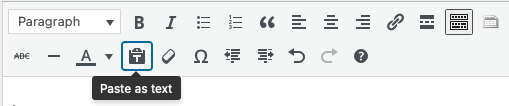
- Avoid copying text from MS Word. If you have to, you can try using the ‘Paste as text’ feature (see screen capture below), which should work most of the time, but not always: not all styling/formatting will be removed. Instead, copy from Word, paste into a text editor like TextEdit (Mac) or NotePad (PC) first, to remove the unseen formatting that Word adds to text.
- Check (and experiment with) the HTML editor. If there is something not displaying correctly, it’s probably a tag hidden in the HTML editor. The HTML editor will show you exactly what will be output to the screen (NOTE: With the exception of <p> tags, but only sometimes . . .).
- Don’t use Headers (h1, h2, etc) to increase font size. If you feel that your theme’s font size is too small, this can easily be adjusted by working with the existing CSS styles in the Custom User CSS under APPEARANCE >> Custom User CSS. This is an easy way to make changes to theme elements like font-size if you’re familiar with CSS.